Kitchen & Dining · Small
Best Portable Heat Press
Compare portable heat presses from HTVRONT, Cricut, Calogy and BetterSub, from mini irons to 12x10 plates, and find the right size for your projects.
Affiliate disclosure: As an Amazon Associate I earn from qualifying purchases.
At a glance
2
Best for Cricut CraftersCricut
3
Best for Small WorkspacesHtvront
4
Best for Sublimation ControlBetterSub
6
Best for Detail and Sewing WorkCricut
7
Best Mini With Temperature ReadoutCalogy
Detailed reviews
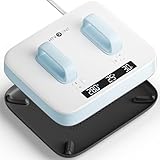
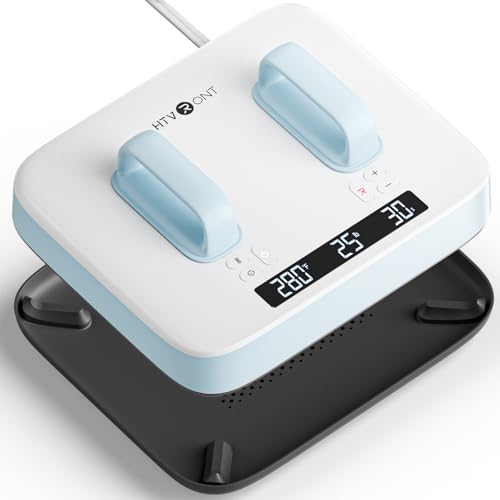
The HTVRONT 12x10 pairs a 12 by 10 inch plate with a screen that shows pressure, time and temperature together. The pressure display is the standout, because even pressure is the part of heat pressing that is hardest to judge by feel. Two handles help you bear down evenly, which the listing ties to fewer lifted edges.
Owners say it heats quickly, holds its heat and spreads it evenly. They also report that switching settings is simple and that the larger plate lets them take on bigger projects. Reports of sublimation on shirts and bags are positive.
Against the Cricut EasyPress SE, it gives you a pressure readout the Cricut does not list, but the listing weight of 9.63 pounds is about double the Cricut's. Compared with the HTVRONT 10x10, it offers more plate area for hoodies and larger designs.
Pros
- Live pressure, time and temperature display
- Large 12x10 plate for bigger designs
- Owners report fast, even heating
- Auto shut-off and insulated base
Cons
- Heaviest press in this roundup at 9.63 pounds
- Less pocket-sized than the minis
The Cricut EasyPress SE is a handheld press with a 12 by 10 inch ceramic-coated plate that reaches up to 400°F. The Cricut Heat Guide gives time and temperature recommendations plus pressing steps for iron-on, Infusible Ink and sublimation materials, which helps beginners avoid guesswork.
At 4.85 pounds it is lighter than the HTVRONT 12x10 and the BetterSub Press, so it is easy to carry between a desk and a craft table. Owners say it heats much faster than an iron and that a shirt can be finished in a few minutes. They like the size for bags, pillowcases and hoodies.
Feedback is not uniform. Some owners report overheating, some say it broke within a few months, and opinions on whether it is worth the cost are split. It also has no pressure readout, which the HTVRONT 12x10 does.
Pros
- Reaches up to 400°F
- Lighter than the other large presses at 4.85 pounds
- Heat Guide gives settings and steps
- Works with iron-on, Infusible Ink and sublimation
Cons
- Some owners report durability problems
- Some report overheating
- No pressure display
The HTVRONT 10x10 shares the pressure, time and temperature screen and dual-handle design of its larger sibling, but on a smaller 10 by 10 inch plate meant to sit on a workbench or desk. It reaches 212°F in the first minute, according to the listing, and has a beep timer and auto shut-off.
Owners like it for small areas and Cricut items, say it beats a regular iron for transfers, and find it easy for making shirts. It is described as handy for small inside tags and small jobs.
The main drawback is heat: some owners say it does not get hot enough. If your materials need high temperatures, the HTVRONT 12x10, Cricut EasyPress SE or BetterSub Press are safer picks.
Pros
- Pressure, time and temperature on one screen
- Smaller footprint than the 12x10 version
- Owners praise fast heat-up and ease of use
- Dual handles for even pressure
Cons
- Some owners say it does not get hot enough
- Smaller plate than the 12x10 models
The BetterSub Press has an 8.3 by 9.7 inch plate, a digital screen for temperature and time, and a range up to 392°F with timing up to 999 seconds. Dual-tube heating is meant to spread heat evenly. At 5.3 pounds it is lighter than the HTVRONT 12x10 and a bit heavier than the Cricut EasyPress SE.
It suits sublimation and vinyl on cotton, polyester, canvas and blends, and the 15-minute auto-off and overheating protection help for home use. The listing positions it for DIY and small workshop jobs.
The catch is that no owner feedback is available here, so reliability is unproven. The plate is also smaller than the 12x10 models and it has no pressure display.
Pros
- Wide temperature and timer range
- Digital screen for temperature and time
- 5.3 pounds, lighter than the HTVRONT 12x10
- Overheat protection and auto-off
Cons
- No owner feedback to check
- No pressure display
- Smaller plate than the 12x10 presses
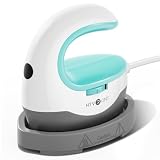
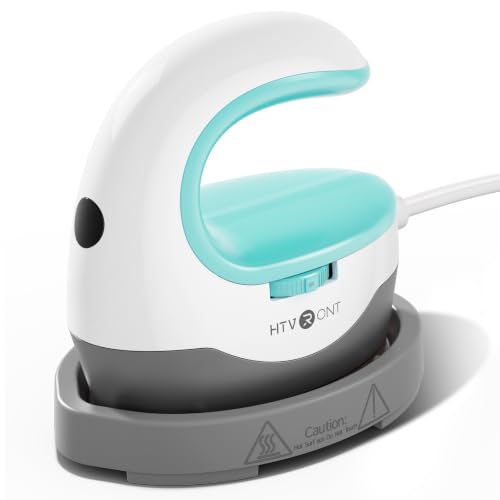
The HTVRONT Mini weighs 0.97 pounds and has a three-position dial for 284°F, 320°F and 356°F. A handle and insulated base keep it safe to hold and set down. Owners say it heats fast, is easy to control on small designs, and works on items like hats that a flat press handles poorly.
One owner who tried sublimation found the small plate made it hard to apply even pressure across the whole design, so treat it as a vinyl and small transfer tool. Heat output feedback is mixed, with some owners saying it gets hot enough and others not.
Compared with the Cricut Mini, it is slightly heavier and uses a dial rather than a button. Against the Calogy Mini, it has no temperature readout.
Pros
- Three heat settings on a simple dial
- Light at 0.97 pounds
- Owners like it for hats and small items
- Insulated base included
Cons
- Heat output feedback is mixed
- Poor fit for sublimation, per one owner
- No temperature display
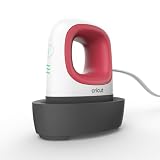
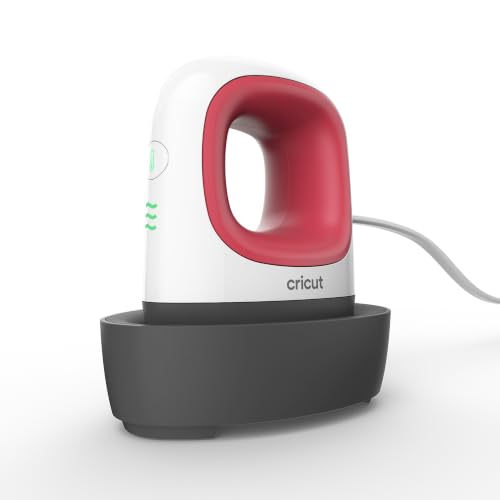
At 0.84 pounds, the Cricut Mini is the lightest option and has three heat settings, a precision tip and auto-off. It works with iron-on, Infusible Ink and sublimation materials, and the listing also points to sewing uses like pressing seams, zippers and small appliques.
Owners report fast, even heat and say it handles sleeves, pockets, curves, patches and in-hoop embroidery appliques. The dock is a frequent plus. One owner reports it reaches only about 300°F on high, so check your material's needs before buying.
A few buyers who ordered from another region reported a US plug, so check voltage and plug if you travel. Compared with the HTVRONT Mini, it adds a precision tip; against the Calogy Mini, it lacks a temperature readout.
Pros
- Lightest press in the group at 0.84 pounds
- Precision tip for tight areas
- Dock and auto-off included
- Owners praise even results on small designs
Cons
- One owner says it tops out near 300°F on high
- US plug may need an adapter abroad
The Calogy Mini has a plate of roughly 2.87 by 4.43 inches and a screen that shows the real-time temperature, a useful feature for a mini. A single button handles power, temperature up and down, and switching between Celsius and Fahrenheit. It offers three levels, 284°F, 320°F and 356°F, and shuts off after 15 minutes idle.
Owners say it heats quickly, is easy to control on small designs, and is comfortable to hold, with one calling it bigger than a baby Cricut iron. However, one owner watched the temperature swing between about 300°F and 360°F on the high setting, and others say it shuts off repeatedly.
At 1.43 pounds it is the heaviest mini here. Pick it over the HTVRONT Mini or Cricut Mini if seeing the temperature matters to you, but expect some risk on consistency.
Pros
- Live temperature display
- Celsius and Fahrenheit switch
- Plug works across 110 to 220V per the listing
- Comfortable handle
Cons
- Some owners report temperature drift
- Some report frequent shut-offs
- Heaviest mini at 1.43 pounds
Side by side
| Pick | Item weight | Warranty |
|---|
#1 Best Overall
Htvront | 9.63 pounds | 1 year |
#2 Best for Cricut Crafters
Cricut | 4.85 pounds | 1 year limited |
#3 Best for Small Workspaces
Htvront | — | 1 year |
#4 Best for Sublimation Control
BetterSub | 5.3 pounds | 1 year |
#5 Best Mini Press
Htvront | 0.97 pounds | 1 year |
#6 Best for Detail and Sewing Work
Cricut | 0.84 pounds | 1 year limited |
#7 Best Mini With Temperature Readout
Calogy | 1.43 pounds | 1 |
How to Choose a Portable Heat Press
Match plate size to what you press
Plate size decides what you can finish in one press. The HTVRONT 12x10 and Cricut EasyPress SE have 12 by 10 inch plates for larger designs on shirts and hoodies. The HTVRONT 10x10 and BetterSub Press are smaller. The minis cover small areas only, which is their strength for hats, sleeves and tags but a limit for adult shirt graphics.
- Full shirt designs: HTVRONT 12x10 or Cricut EasyPress SE
- Desktop crafting: HTVRONT 10x10 or BetterSub Press
- Hats, sleeves, appliques: HTVRONT Mini, Cricut Mini or Calogy Mini
Check temperature range and readouts
Make sure the press reaches what your material needs. The Cricut EasyPress SE goes up to 400°F, the BetterSub Press to 392°F, and the HTVRONT Mini and Calogy Mini top out at 356°F. Some owners of the HTVRONT 10x10 and the minis say heat feels low, so verify before buying for demanding materials. A screen showing temperature, like on the Calogy Mini and the larger HTVRONT and BetterSub presses, helps you spot drift.
Think about pressure and sublimation
Pressure is easy to get wrong, especially with sublimation. The HTVRONT presses show pressure on screen, and the dual handles help spread it. Minis make even pressure harder across a design, and one HTVRONT Mini owner found sublimation spotty, so reserve minis for vinyl and small transfers.
Weigh portability against durability reports
Weight ranges from under a pound for the minis to 9.63 pounds for the HTVRONT 12x10. Also read owner feedback: some Cricut EasyPress SE owners report early failures, and some Calogy Mini owners report shut-offs, while the BetterSub Press has no feedback at all.
Our picks at a glance
2
Best for Cricut CraftersCricut
3
Best for Small WorkspacesHtvront
4
Best for Sublimation ControlBetterSub
6
Best for Detail and Sewing WorkCricut
7
Best Mini With Temperature ReadoutCalogy
Frequently asked
Can a portable heat press handle sublimation?
The HTVRONT 12x10, Cricut EasyPress SE, BetterSub Press and Cricut Mini list sublimation support. Larger plates give more even pressure, and one owner found the HTVRONT Mini uneven for sublimation, so use a larger press for it.
Is a mini heat press enough for T-shirts?
Minis suit small designs, pockets, sleeves and hats, but their plates cover only a small area. For large shirt graphics, choose the HTVRONT 12x10 or Cricut EasyPress SE.
Which portable press shows pressure?
The HTVRONT 12x10 and HTVRONT 10x10 both have a built-in pressure sensor and screen. None of the other picks list a pressure display.
Do these presses shut off automatically?
The HTVRONT 12x10 and 10x10, Calogy Mini and BetterSub Press list a 15-minute auto-off, and the Cricut Mini lists an auto-off feature. The HTVRONT Mini listing doesn't mention one.